The multilayer perceptron (MLP) performs a sequence of linear transformations and non-linear activations. For an \(L\)-layer network, the forward propagation for each layer \(l\) is given by:
\[s^{(l)} = W^{(l)}a^{(l-1)} + b^{(l)}\]
\[a^{(l)} = h^{(l)}(s^{(l)})\]
Where:
\(s^{(l)}\) is the pre-activation value at layer \(l\)
\(a^{(l)}\) is the activation value at layer \(l\), with \(a^{(0)} = x\) (the input)
\(W^{(l)}\) and \(b^{(l)}\) are the weights and biases for layer \(l\)
\(h^{(l)}\) is the activation function for layer \(l\)
For backpropagation, we define a cost function \(C\) that measures the difference between the network output \(a^{(L)}\) and the target \(y\). The goal is to compute gradients of \(C\) with respect to all parameters for optimization.
Note
In neural network literature, pre-activation values are often denoted as \(z\), but we follow the convention of using \(s\) for consistency with related course materials.
The Delta Method for Backpropagation
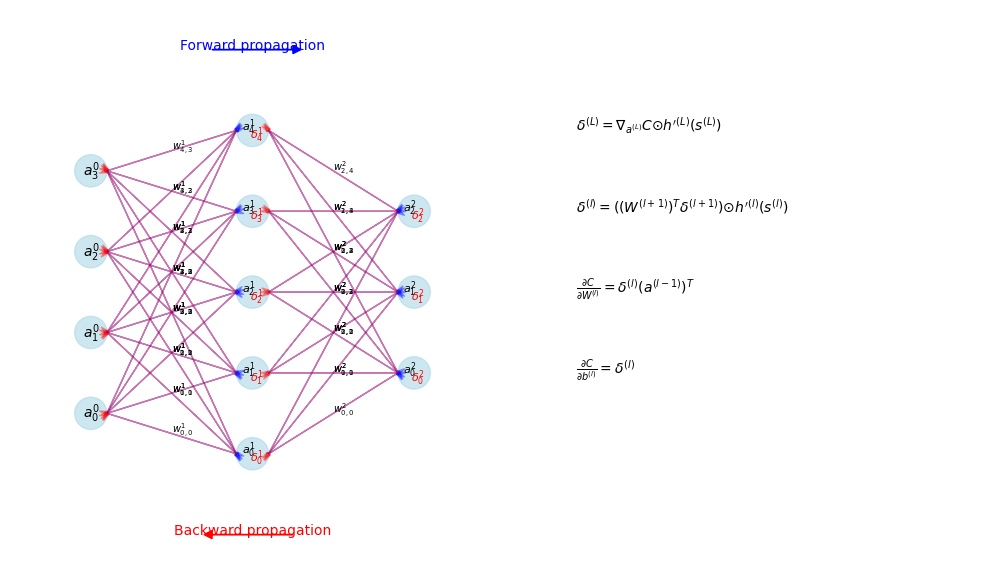
The delta method provides an efficient approach to computing gradients by reusing intermediate calculations. We define the error term \(\delta^{(l)}\) for each layer as:
This represents how the cost function changes with respect to small changes in the pre-activation values. The key insight of backpropagation is that these error terms can be computed recursively:
Where \(\odot\) represents element-wise multiplication and \(h'^{(l)}\) is the derivative of the activation function. From these error terms, we derive parameter gradients:
importnumpyasnpimportmatplotlib.pyplotaspltdefvisualize_delta_flow():# Create a small network visualization with error termsfig,ax=plt.subplots(figsize=(10,6))# Layer dimensionslayer_sizes=[4,5,3]# Set up layer positionslayer_positions=[1,3,5]# Node positionsnode_positions=[]fori,sizeinenumerate(layer_sizes):positions=[]forjinrange(size):positions.append((layer_positions[i],j-(size-1)/2))node_positions.append(positions)# Draw nodesforlayer_idx,layerinenumerate(node_positions):fornode_idx,(x,y)inenumerate(layer):# Nodecircle=plt.Circle((x,y),0.2,fill=True,alpha=0.6,color='lightblue')ax.add_patch(circle)# Labelsiflayer_idx==0:ax.text(x,y,f"$a^{(0)}_{node_idx}$",ha='center',va='center')else:ax.text(x-0.05,y+0.05,f"$a^{(layer_idx)}_{node_idx}$",ha='center',va='center',fontsize=8)ax.text(x+0.05,y-0.05,f"$δ^{(layer_idx)}_{node_idx}$",ha='center',va='center',fontsize=8,color='red')# Draw connections for forward pass (blue) and backward pass (red)forlayer_idxinrange(len(layer_sizes)-1):forsrc_idx,(x1,y1)inenumerate(node_positions[layer_idx]):fortgt_idx,(x2,y2)inenumerate(node_positions[layer_idx+1]):# Forward connection (blue)ax.arrow(x1+0.2,y1,x2-x1-0.4,y2-y1,head_width=0.05,head_length=0.1,fc='blue',ec='blue',alpha=0.3)# Backward connection (red)ax.arrow(x2-0.2,y2,x1-x2+0.4,y1-y2,head_width=0.05,head_length=0.1,fc='red',ec='red',alpha=0.3)# Weight label (on forward connection)wx=(x1+x2)/2wy=(y1+y2)/2ax.text(wx,wy,f"$w^{(layer_idx+1)}_{{{tgt_idx},{src_idx}}}$",fontsize=7)# Add forward/backward pass labelsax.text(3,3,"Forward propagation",color='blue',ha='center')ax.arrow(2.5,3,1,0,head_width=0.1,head_length=0.1,fc='blue',ec='blue')ax.text(3,-3,"Backward propagation",color='red',ha='center')ax.arrow(3.5,-3,-1,0,head_width=0.1,head_length=0.1,fc='red',ec='red')# Add equation labelsequations=["$δ^{(L)} = ∇_{a^{(L)}}C ⊙ h'^{(L)}(s^{(L)})$","$δ^{(l)} = ((W^{(l+1)})^Tδ^{(l+1)}) ⊙ h'^{(l)}(s^{(l)})$","$\\frac{∂C}{∂W^{(l)}} = δ^{(l)}(a^{(l-1)})^T$","$\\frac{∂C}{∂b^{(l)}} = δ^{(l)}$"]fori,eqinenumerate(equations):ax.text(7,2-i,eq,fontsize=10)ax.set_xlim(0,12)ax.set_ylim(-3.5,3.5)ax.set_aspect('equal')ax.axis('off')plt.tight_layout()plt.show()visualize_delta_flow()
Illustration of error term propagation in backpropagation
Activation Functions and Derivatives
Activation functions introduce non-linearity into neural networks, enabling them to learn complex patterns. The choice of activation function affects training dynamics and model performance.
ReLU and Tanh Functions
Two common activation functions are Rectified Linear Unit (ReLU) and hyperbolic tangent (tanh).
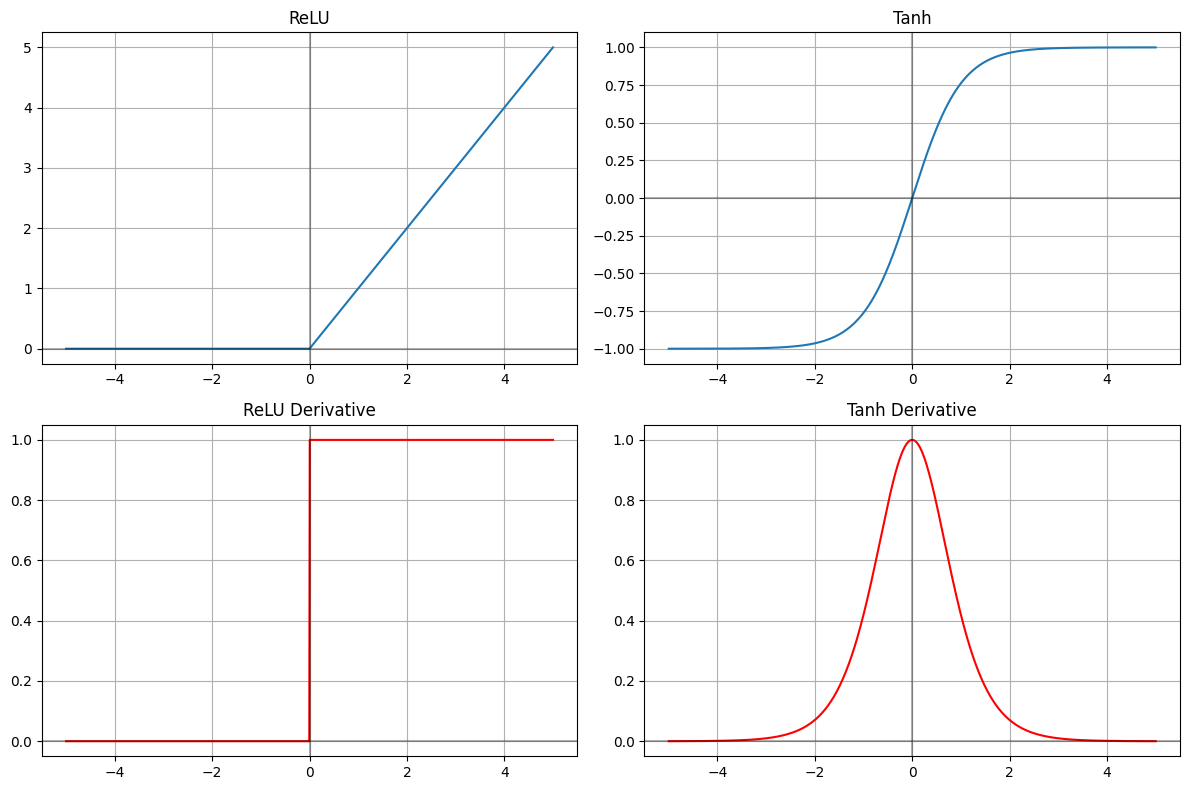
ReLU Activation
ReLU is defined as:
\[\text{ReLU}(x) = \max(0, x)\]
With derivative:
\[\text{ReLU}'(x) = \begin{cases}
1 & \text{if } x > 0 \\
0 & \text{if } x < 0 \\
\text{undefined} & \text{if } x = 0
\end{cases}\]
In practice, any value in \([0,1]\) can be used for the derivative at \(x=0\).
The choice of activation function significantly impacts how gradients propagate through the network. This directly affects training dynamics and can lead to issues like the vanishing or exploding gradient problem.
The derivative of an activation function determines how much of the gradient signal passes through a neuron during backpropagation:
For tanh, the derivative has a maximum value of 1 at x=0 and approaches 0 as |x| increases. This can cause gradients to diminish as they propagate through many layers.
For ReLU, the derivative is either 0 (for negative inputs) or 1 (for positive inputs). This binary nature can lead to better gradient flow for positive activations but can cause “dying ReLU” problems when too many neurons have negative inputs.
importnumpyasnpimportmatplotlib.pyplotaspltdefdemonstrate_gradient_propagation():"""Demonstrate how gradients propagate through layers with different activations"""depth=10# Number of layersn_samples=1000# Generate random initial gradientsnp.random.seed(42)initial_gradients=np.random.normal(0,1,(n_samples,))# Track gradients through layersrelu_gradients=[initial_gradients]tanh_gradients=[initial_gradients]# Propagate through layersfor_inrange(depth):# For ReLU: randomly zero out 50% of values (simulating negative inputs)relu_mask=np.random.binomial(1,0.5,size=n_samples)relu_layer_grad=relu_gradients[-1]*relu_maskrelu_gradients.append(relu_layer_grad)# For tanh: multiply by derivative values (simulating tanh derivative distribution)# Tanh derivatives are maximum 1 at x=0, and decrease as |x| increasesx_values=np.random.normal(0,2,size=n_samples)# Simulated pre-activationstanh_derivative=1-np.tanh(x_values)**2# Actual tanh derivativetanh_layer_grad=tanh_gradients[-1]*tanh_derivativetanh_gradients.append(tanh_layer_grad)# Calculate average gradient magnitude per layerrelu_magnitudes=[np.mean(np.abs(g))forginrelu_gradients]tanh_magnitudes=[np.mean(np.abs(g))forgintanh_gradients]# Add noise to simulate real training conditionslayers=np.arange(depth+1)relu_magnitudes_noisy=np.array(relu_magnitudes)*(1+np.random.normal(0,0.05,size=len(relu_magnitudes)))tanh_magnitudes_noisy=np.array(tanh_magnitudes)*(1+np.random.normal(0,0.05,size=len(tanh_magnitudes)))plt.figure(figsize=(10,6))plt.plot(layers,relu_magnitudes_noisy,'b-',marker='o',label='ReLU')plt.plot(layers,tanh_magnitudes_noisy,'r-',marker='x',label='Tanh')plt.xlabel('Layer (backward from output)')plt.ylabel('Average Gradient Magnitude')plt.title('Gradient Magnitude through Backward Propagation')plt.legend()plt.grid(True)plt.show()demonstrate_gradient_propagation()
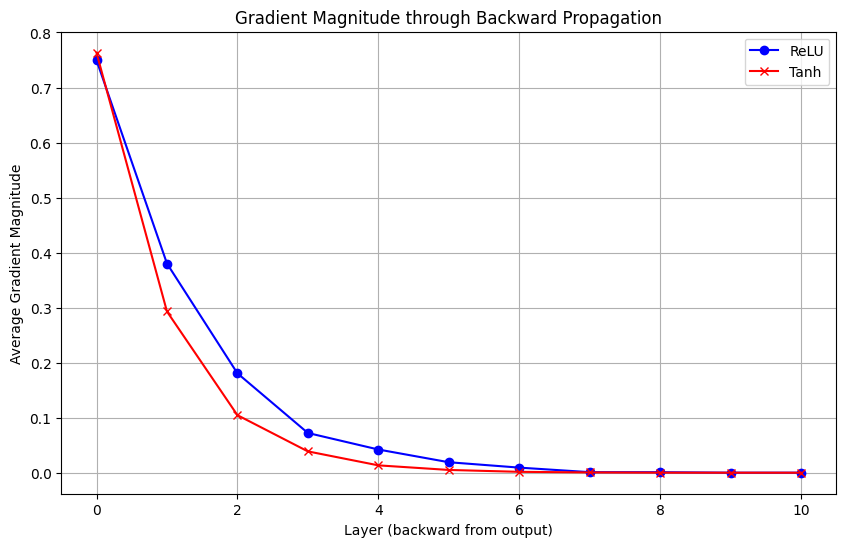
Gradient magnitude decay through network layers for different activation functions
Important
The vanishing gradient problem is particularly severe in deep networks with saturating activation functions like tanh. As shown in the figure, gradient magnitude can diminish exponentially with network depth, making training early layers very difficult. ReLU mitigates this issue for positive activations but introduces sparsity through “dead” neurons.
Loss Functions and Optimization
Cross-Entropy for Multi-class Classification
For neural networks performing classification tasks, cross-entropy loss provides an appropriate measure of prediction error. For multi-class classification with one-hot encoded targets, the cross-entropy loss is defined as:
This elegant simplification occurs because the derivative of softmax combines with the derivative of cross-entropy, making the implementation of backpropagation more efficient.
Numerical Stability in Loss Computation
Direct implementation of cross-entropy can lead to numerical instability due to potential division by zero or logarithm of very small numbers. A numerically stable implementation involves adding a small epsilon value:
defstable_cross_entropy(y_true,y_pred):"""Numerically stable implementation of cross-entropy loss"""# Add small epsilon to avoid log(0)epsilon=1e-15y_pred=np.clip(y_pred,epsilon,1-epsilon)return-np.sum(y_true*np.log(y_pred),axis=0)
Similarly, when implementing softmax, shifting the inputs by their maximum value improves numerical stability:
defstable_softmax(z):"""Numerically stable implementation of softmax"""# Shift by the maximum value for numerical stabilityshifted_z=z-np.max(z,axis=0,keepdims=True)exp_z=np.exp(shifted_z)returnexp_z/np.sum(exp_z,axis=0,keepdims=True)
Tip
Numerical stability is critical for successful training of neural networks. Unstable implementations can lead to NaN values during training, causing the optimization process to fail. Always use stable implementations of critical functions like softmax and cross-entropy.
Stochastic Gradient Descent and Variants
Neural networks are typically trained using variants of stochastic gradient descent (SGD). The basic update rule is:
Where \(\theta\) represents the network parameters, \(\eta\) is the learning rate, and \(\nabla_\theta C\) is the gradient of the cost function with respect to the parameters.
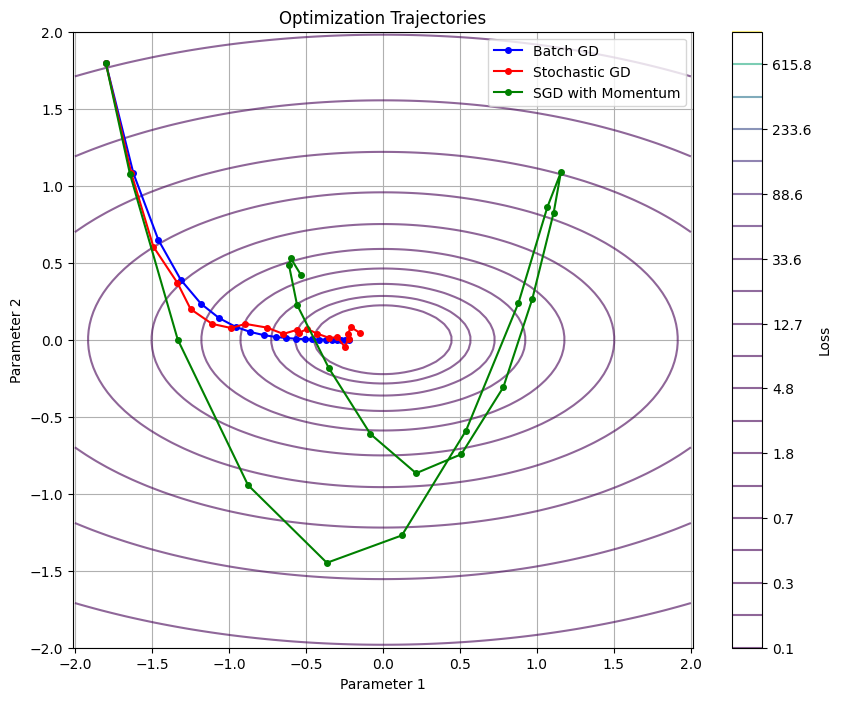
Three common approaches to gradient-based optimization are:
Batch Gradient Descent: Computes gradients using the entire dataset.
Stable updates but computationally expensive
Theoretical convergence rate: \(O\left(\frac{1}{t}\right)\) for convex functions
Stochastic Gradient Descent (SGD): Updates parameters using gradients computed from a single training example.
Noisy updates but computationally efficient
Theoretical convergence rate: \(O\left(\frac{1}{\sqrt{t}}\right)\) for convex functions
Mini-batch SGD: Computes gradients using a small batch of examples.
Balances stability and efficiency
Common batch sizes range from 32 to 256
importnumpyasnpimportmatplotlib.pyplotaspltdefplot_sgd_variants():"""Visualize optimization trajectories for different SGD variants"""# Generate a simple loss surfacex=np.linspace(-2,2,100)y=np.linspace(-2,2,100)X,Y=np.meshgrid(x,y)Z=0.5*X**2+2*Y**2# Simple quadratic function# Create optimization paths# Starting pointstart_x,start_y=-1.8,1.8# Batch GD - steady pathbatch_path_x,batch_path_y=[start_x],[start_y]x_curr,y_curr=start_x,start_ylr=0.1for_inrange(20):# Gradient of our function: [x, 4y]grad_x,grad_y=x_curr,4*y_currx_curr-=lr*grad_xy_curr-=lr*grad_ybatch_path_x.append(x_curr)batch_path_y.append(y_curr)# SGD - noisy pathsgd_path_x,sgd_path_y=[start_x],[start_y]x_curr,y_curr=start_x,start_yfor_inrange(20):# Add noise to gradients to simulate stochasticitynoise_x=np.random.normal(0,0.3)noise_y=np.random.normal(0,0.3)grad_x,grad_y=x_curr+noise_x,4*y_curr+noise_yx_curr-=lr*grad_xy_curr-=lr*grad_ysgd_path_x.append(x_curr)sgd_path_y.append(y_curr)# SGD with momentum - smoother path with inertiamomentum_path_x,momentum_path_y=[start_x],[start_y]x_curr,y_curr=start_x,start_yvx,vy=0,0# Initialize velocitybeta=0.9# Momentum parameterfor_inrange(20):# Add noise to gradients to simulate stochasticitynoise_x=np.random.normal(0,0.3)noise_y=np.random.normal(0,0.3)grad_x,grad_y=x_curr+noise_x,4*y_curr+noise_y# Update with momentumvx=beta*vx-lr*grad_xvy=beta*vy-lr*grad_yx_curr+=vxy_curr+=vymomentum_path_x.append(x_curr)momentum_path_y.append(y_curr)# Plotplt.figure(figsize=(10,8))# Plot the contourlevels=np.logspace(-1,3,20)contour=plt.contour(X,Y,Z,levels=levels,alpha=0.6,cmap='viridis')plt.colorbar(contour,label='Loss')# Plot pathsplt.plot(batch_path_x,batch_path_y,'bo-',label='Batch GD',markersize=4)plt.plot(sgd_path_x,sgd_path_y,'ro-',label='Stochastic GD',markersize=4)plt.plot(momentum_path_x,momentum_path_y,'go-',label='SGD with Momentum',markersize=4)plt.title('Optimization Trajectories')plt.xlabel('Parameter 1')plt.ylabel('Parameter 2')plt.legend()plt.grid(True)plt.axis('equal')plt.show()np.random.seed(42)plot_sgd_variants()
Optimization trajectories for different SGD variants on a simple quadratic surface
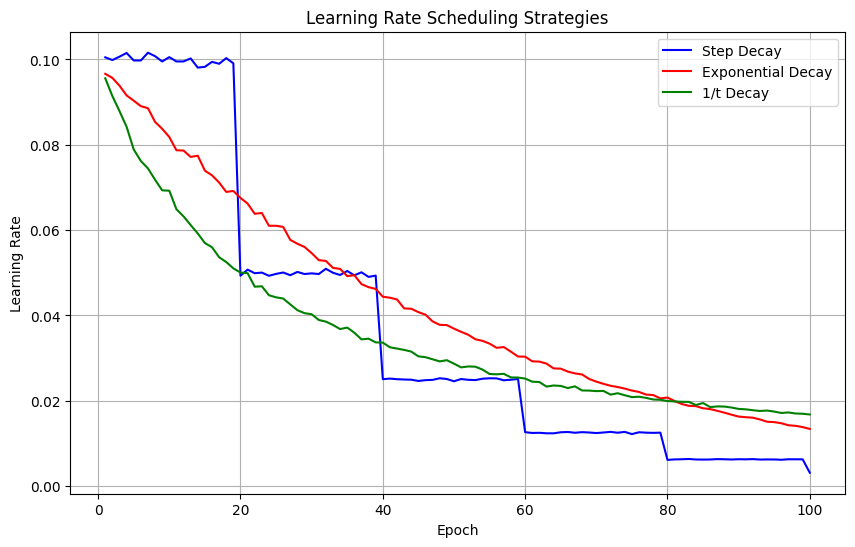
Learning Rate Scheduling
The learning rate significantly impacts training dynamics. A learning rate that is too high can cause oscillation or divergence, while one that is too low leads to slow convergence.
Learning rate scheduling adjusts the learning rate during training, typically decreasing it over time. This allows for large initial steps to quickly approach the optimal region, followed by smaller steps for fine-tuning.
Common scheduling strategies include:
Step Decay: Reduces the learning rate by a factor after a fixed number of epochs.
where \(\gamma\) is the decay factor and \(s\) is the step size.
Exponential Decay: Continuously reduces the learning rate at an exponential rate.
\[\eta_t = \eta_0 \cdot e^{-kt}\]
where \(k\) is the decay rate.
1/t Decay: Reduces the learning rate proportionally to the inverse of the iteration count.
\[\eta_t = \frac{\eta_0}{1 + kt}\]
where \(k\) controls the decay speed.
importnumpyasnpimportmatplotlib.pyplotaspltdefplot_lr_schedules():"""Visualize different learning rate scheduling strategies"""# Parametersepochs=np.arange(1,101)initial_lr=0.1# Step decay (every 20 epochs, reduce by half)step_decay_lr=initial_lr*(0.5**(np.floor(epochs/20)))# Exponential decayexp_decay_lr=initial_lr*np.exp(-0.02*epochs)# 1/t decayinverse_decay_lr=initial_lr/(1+0.05*epochs)# Add noise to make it look like real training datastep_decay_lr=step_decay_lr*(1+np.random.normal(0,0.01,size=len(epochs)))exp_decay_lr=exp_decay_lr*(1+np.random.normal(0,0.01,size=len(epochs)))inverse_decay_lr=inverse_decay_lr*(1+np.random.normal(0,0.01,size=len(epochs)))# Plotplt.figure(figsize=(10,6))plt.plot(epochs,step_decay_lr,'b-',label='Step Decay')plt.plot(epochs,exp_decay_lr,'r-',label='Exponential Decay')plt.plot(epochs,inverse_decay_lr,'g-',label='1/t Decay')plt.xlabel('Epoch')plt.ylabel('Learning Rate')plt.title('Learning Rate Scheduling Strategies')plt.legend()plt.grid(True)plt.show()np.random.seed(42)plot_lr_schedules()
Common learning rate scheduling strategies
The step decay approach is often used in practice for its simplicity and effectiveness. For the MNIST classification task, a common strategy is to start with a modest learning rate (e.g., 0.01-0.1) and reduce it by a factor of 2-10 after a fixed number of epochs.
Weight Initialization Strategies
Importance of Proper Initialization
Proper weight initialization is critical for neural network training. Poor initialization can lead to:
Vanishing gradients: When weights are too small, activations and their gradients become negligible, slowing or stopping learning.
Exploding gradients: When weights are too large, activations and gradients grow exponentially, causing numerical instability.
Symmetry problems: If all weights are initialized to the same value, neurons in the same layer will compute identical outputs and receive identical gradient updates.
Initialization should break symmetry between neurons while maintaining appropriate scales for activations and gradients.
Common Initialization Methods
Random Initialization
The simplest approach is to initialize weights from a uniform or normal distribution:
W=np.random.randn(output_size,input_size)*0.01
This works for shallow networks but often leads to vanishing or exploding gradients in deeper networks.
Xavier/Glorot Initialization
Xavier initialization scales weights based on the number of input and output connections:
This accounts for the fact that ReLU sets approximately half of the activations to zero.
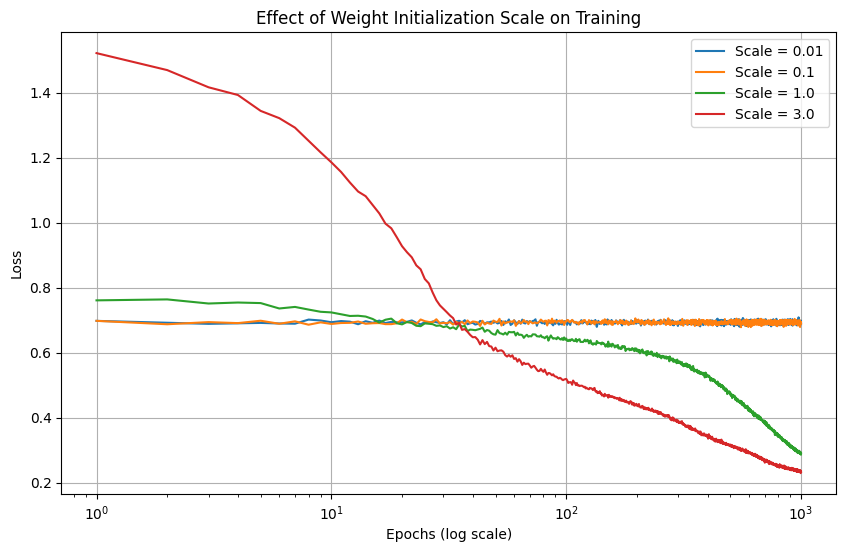
importnumpyasnpimportmatplotlib.pyplotaspltdefdemonstrate_initialization_effects():"""Visualize how different initialization strategies affect training"""# Set up a simple problemnp.random.seed(42)# Generate synthetic data: XOR-like problemX=np.array([[0,0],[0,1],[1,0],[1,1]])y=np.array([[0],[1],[1],[0]])defrun_training_simulation(init_scale,n_runs=10,n_epochs=1000):loss_histories=np.zeros((n_runs,n_epochs))forruninrange(n_runs):# Initialize a simple 2-layer networkW1=np.random.randn(2,2)*init_scaleb1=np.zeros((2,1))W2=np.random.randn(1,2)*init_scaleb2=np.zeros((1,1))# Simplified training loopforepochinrange(n_epochs):# Forward passZ1=np.dot(X,W1.T)+b1.TA1=np.tanh(Z1)Z2=np.dot(A1,W2.T)+b2.TA2=1/(1+np.exp(-Z2))# Sigmoid# Compute lossloss=-np.mean(y*np.log(A2+1e-10)+(1-y)*np.log(1-A2+1e-10))loss_histories[run,epoch]=loss# Backward pass (simplified for simulation)dZ2=A2-ydW2=np.dot(dZ2.T,A1)/X.shape[0]db2=np.sum(dZ2,axis=0,keepdims=True).T/X.shape[0]dA1=np.dot(dZ2,W2)dZ1=dA1*(1-A1**2)# tanh derivativedW1=np.dot(dZ1.T,X)/X.shape[0]db1=np.sum(dZ1,axis=0,keepdims=True).T/X.shape[0]# Update parameterslr=0.1W1-=lr*dW1b1-=lr*db1W2-=lr*dW2b2-=lr*db2# Add some noise to make the curves look more realisticnoise=np.random.normal(0,0.02,loss_histories.shape)loss_histories=loss_histories+noise*loss_historiesreturnnp.mean(loss_histories,axis=0)# Compare different initialization scalesinit_scales=[0.01,0.1,1.0,3.0]results=[run_training_simulation(scale)forscaleininit_scales]# Plot resultsplt.figure(figsize=(10,6))epochs=range(1,1001)fori,scaleinenumerate(init_scales):plt.plot(epochs,results[i],label=f'Scale = {scale}')plt.xscale('log')plt.xlabel('Epochs (log scale)')plt.ylabel('Loss')plt.title('Effect of Weight Initialization Scale on Training')plt.legend()plt.grid(True)plt.show()demonstrate_initialization_effects()
Effect of initialization scale on training convergence
Note
The mathematical justification for these initialization schemes lies in maintaining the variance of activations and gradients through the network. If the variance changes significantly at each layer, it can lead to signals being magnified or diminished exponentially with network depth, causing training difficulties.
Visualizing Weight Distributions
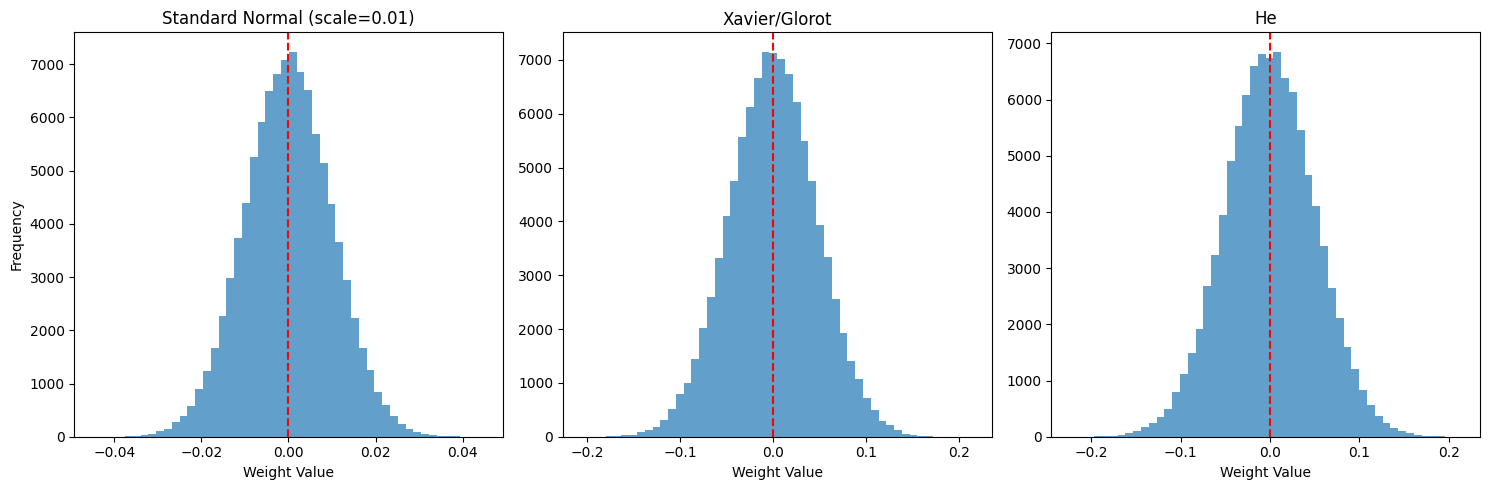
The distribution of weights during initialization provides insight into the network’s starting condition:
importnumpyasnpimportmatplotlib.pyplotaspltdefvisualize_weight_distributions():"""Visualize weight distributions for different initialization methods"""# Initialize weights for a network with layers [784, 128, 64, 10]np.random.seed(42)# Layer sizes for a typical MNIST networklayer_sizes=[784,128,64,10]# Standard normal (scale=0.01)std_weights=[np.random.randn(layer_sizes[i+1],layer_sizes[i])*0.01foriinrange(len(layer_sizes)-1)]# Xavier/Glorotxavier_weights=[np.random.randn(layer_sizes[i+1],layer_sizes[i])*np.sqrt(2/(layer_sizes[i]+layer_sizes[i+1]))foriinrange(len(layer_sizes)-1)]# Hehe_weights=[np.random.randn(layer_sizes[i+1],layer_sizes[i])*np.sqrt(2/layer_sizes[i])foriinrange(len(layer_sizes)-1)]# Plot distributions for the first hidden layerlayer_idx=0# First layer (784 -> 128)plt.figure(figsize=(15,5))# Standard normalplt.subplot(1,3,1)plt.hist(std_weights[layer_idx].flatten(),bins=50,alpha=0.7)plt.title(f'Standard Normal (scale=0.01)')plt.xlabel('Weight Value')plt.ylabel('Frequency')plt.axvline(x=0,color='r',linestyle='--')# Xavier/Glorotplt.subplot(1,3,2)plt.hist(xavier_weights[layer_idx].flatten(),bins=50,alpha=0.7)plt.title(f'Xavier/Glorot')plt.xlabel('Weight Value')plt.axvline(x=0,color='r',linestyle='--')# Heplt.subplot(1,3,3)plt.hist(he_weights[layer_idx].flatten(),bins=50,alpha=0.7)plt.title(f'He')plt.xlabel('Weight Value')plt.axvline(x=0,color='r',linestyle='--')plt.tight_layout()plt.show()# Print variance statisticsprint("Weight variance statistics for Layer 1 (784 -> 128):")print(f"Standard Normal (0.01): {np.var(std_weights[layer_idx]):.8f}")print(f"Xavier/Glorot: {np.var(xavier_weights[layer_idx]):.8f}")print(f"He: {np.var(he_weights[layer_idx]):.8f}")print(f"Theoretical Xavier/Glorot: {2/(layer_sizes[0]+layer_sizes[1]):.8f}")print(f"Theoretical He: {2/layer_sizes[0]:.8f}")visualize_weight_distributions()
Weight variance statistics for Layer 1 (784 -> 128):
Standard Normal (0.01): 0.00010017
Xavier/Glorot: 0.00219184
He: 0.00255052
Theoretical Xavier/Glorot: 0.00219298
Theoretical He: 0.00255102
Weight distributions for different initialization methods
For MNIST classification, either Xavier (for tanh) or He (for ReLU) initialization is appropriate, depending on the chosen activation function.
Regularization Techniques
Overfitting in Neural Networks
Neural networks, particularly those with many parameters, are prone to overfitting—the phenomenon where a model learns the training data too well, including its noise and peculiarities, at the expense of generalization to new data.
Signs of overfitting include:
Training loss continues to decrease while validation loss begins to increase
Large gap between training and validation performance
Network makes confident but incorrect predictions on test data
Regularization techniques aim to prevent overfitting by constraining the model’s complexity or adding noise during training.
Weight Penalties (L1 and L2 Regularization)
Weight penalty regularization adds a term to the cost function that penalizes large weights:
\[C_{reg} = C + \lambda R(W)\]
Where \(C\) is the original cost function, \(\lambda\) is the regularization strength, and \(R(W)\) is the regularization term.
L2 Regularization (Weight Decay)
L2 regularization adds the sum of squared weights to the cost:
#| label: fig-regularization#| fig-cap: "Effect of regularization on model fit and weight distributions"# TODO: fix, exploding gradient issueimportnumpyasnpimportmatplotlib.pyplotaspltdefdemonstrate_regularization_effects():"""Visualize how regularization affects model fit and weight distribution"""np.random.seed(42)# Generate synthetic datan_samples=150X=np.linspace(-3,3,n_samples).reshape(-1,1)true_function=lambdax:np.sin(x)+0.3*xy=true_function(X)+np.random.normal(0,0.2,size=X.shape)# Split into train and testtrain_idx=np.random.choice(n_samples,int(0.8*n_samples),replace=False)test_idx=np.array(list(set(range(n_samples))-set(train_idx)))X_train,y_train=X[train_idx],y[train_idx]X_test,y_test=X[test_idx],y[test_idx]# Function to create polynomial featuresdefcreate_poly_features(X,degree):returnnp.column_stack([X**iforiinrange(1,degree+1)])# Polynomial degreedegree=15# Create polynomial featuresX_train_poly=create_poly_features(X_train,degree)X_test_poly=create_poly_features(X_test,degree)# Train three models: no regularization, L2, and L1# Function to train a model with different regularizationdeftrain_model(X,y,l2_lambda=0,l1_lambda=0,iterations=5000):# Initialize weights randomlyw=np.random.randn(X.shape[1],y.shape[1])*0.01# Add some noise to training process to simulate real conditionslr=0.01losses=[]weight_history=[]foriinrange(iterations):# Predictionsy_pred=X@w# Base loss (MSE)mse_loss=np.mean((y_pred-y)**2)# Add regularization terms to lossl2_term=0l1_term=0ifl2_lambda>0:l2_term=l2_lambda*np.sum(w**2)ifl1_lambda>0:l1_term=l1_lambda*np.sum(np.abs(w))total_loss=mse_loss+l2_term+l1_termlosses.append(total_loss)# Store weights periodicallyifi%500==0:weight_history.append(w.copy())# Compute gradients# MSE gradientmse_grad=2*X.T@(y_pred-y)/len(y)# L2 gradientl2_grad=0ifl2_lambda>0:l2_grad=2*l2_lambda*w# L1 gradientl1_grad=0ifl1_lambda>0:l1_grad=l1_lambda*np.sign(w)# Combined gradientgradient=mse_grad+l2_grad+l1_grad# Update weightsw=w-lr*gradient# Add some noise to weights to simulate stochastic trainingifi%100:w=w+np.random.normal(0,0.001,size=w.shape)returnw,losses,weight_history# Train models with different regularizationw_no_reg,losses_no_reg,wh_no_reg=train_model(X_train_poly,y_train)w_l2,losses_l2,wh_l2=train_model(X_train_poly,y_train,l2_lambda=0.1)w_l1,losses_l1,wh_l1=train_model(X_train_poly,y_train,l1_lambda=0.1)# Make predictionsy_pred_no_reg=X_test_poly@w_no_regy_pred_l2=X_test_poly@w_l2y_pred_l1=X_test_poly@w_l1# Calculate test errorsmse_no_reg=np.mean((y_test-y_pred_no_reg)**2)mse_l2=np.mean((y_test-y_pred_l2)**2)mse_l1=np.mean((y_test-y_pred_l1)**2)# Plot resultsplt.figure(figsize=(15,10))# Plot model fitsplt.subplot(2,2,1)plt.scatter(X_train,y_train,color='blue',alpha=0.6,label='Training Data')plt.scatter(X_test,y_test,color='green',alpha=0.6,label='Test Data')X_plot=np.linspace(-3,3,100).reshape(-1,1)X_plot_poly=create_poly_features(X_plot,degree)plt.plot(X_plot,X_plot_poly@w_no_reg,'r-',label=f'No Reg (Test MSE: {mse_no_reg:.4f})')plt.plot(X_plot,X_plot_poly@w_l2,'g-',label=f'L2 Reg (Test MSE: {mse_l2:.4f})')plt.plot(X_plot,X_plot_poly@w_l1,'b-',label=f'L1 Reg (Test MSE: {mse_l1:.4f})')plt.plot(X_plot,true_function(X_plot),'k--',label='True Function')plt.title('Model Fit with Different Regularization')plt.xlabel('X')plt.ylabel('y')plt.legend()plt.grid(True)# Plot training curvesplt.subplot(2,2,2)plt.plot(losses_no_reg,'r-',label='No Regularization')plt.plot(losses_l2,'g-',label='L2 Regularization')plt.plot(losses_l1,'b-',label='L1 Regularization')plt.title('Training Loss')plt.xlabel('Iteration')plt.ylabel('Loss')plt.legend()plt.grid(True)# Plot final weight distributionsplt.subplot(2,2,3)plt.stem(range(1,degree+1),w_no_reg,'r',label='No Regularization',markerfmt='ro')plt.stem(range(1,degree+1),w_l2,'g',label='L2 Regularization',markerfmt='go')plt.stem(range(1,degree+1),w_l1,'b',label='L1 Regularization',markerfmt='bo')plt.title('Final Weight Values')plt.xlabel('Polynomial Degree')plt.ylabel('Weight Value')plt.legend()plt.grid(True)# Plot weight magnitude evolution (L2 norm)plt.subplot(2,2,4)w_norms_no_reg=[np.linalg.norm(w)forwinwh_no_reg]w_norms_l2=[np.linalg.norm(w)forwinwh_l2]w_norms_l1=[np.linalg.norm(w)forwinwh_l1]iterations=np.arange(0,5000,500)plt.plot(iterations,w_norms_no_reg,'r-o',label='No Regularization')plt.plot(iterations,w_norms_l2,'g-o',label='L2 Regularization')plt.plot(iterations,w_norms_l1,'b-o',label='L1 Regularization')plt.title('Weight Magnitude Evolution')plt.xlabel('Iteration')plt.ylabel('Weight L2 Norm')plt.legend()plt.grid(True)plt.tight_layout()plt.show()demonstrate_regularization_effects()
Tip
For MNIST classification, L2 regularization is often sufficient and widely used. A typical value for the regularization parameter \(\lambda\) is in the range of 0.0001 to 0.01, depending on the network size and dataset characteristics.
Implementing Regularization
Adding regularization to the backpropagation algorithm requires modifying both the cost function and the weight update rule:
defcompute_cost_with_regularization(y_true,y_pred,weights,lambda_val,reg_type='L2'):"""Compute cost with regularization"""# Base cost (e.g., cross-entropy)base_cost=compute_cost(y_true,y_pred)# Regularization termreg_cost=0ifreg_type=='L2':forwinweights:reg_cost+=np.sum(np.square(w))reg_cost*=(lambda_val/(2*len(y_true)))elifreg_type=='L1':forwinweights:reg_cost+=np.sum(np.abs(w))reg_cost*=(lambda_val/len(y_true))returnbase_cost+reg_costdefupdate_parameters_with_regularization(param,grad,learning_rate,lambda_val,m,reg_type='L2'):"""Update parameters with regularization"""ifreg_type=='L2':# L2 regularization (weight decay)param-=learning_rate*(grad+(lambda_val/m)*param)elifreg_type=='L1':# L1 regularizationparam-=learning_rate*(grad+(lambda_val/m)*np.sign(param))else:# No regularizationparam-=learning_rate*gradreturnparam
Learning Curves and Diagnostics
Monitoring Training Progress
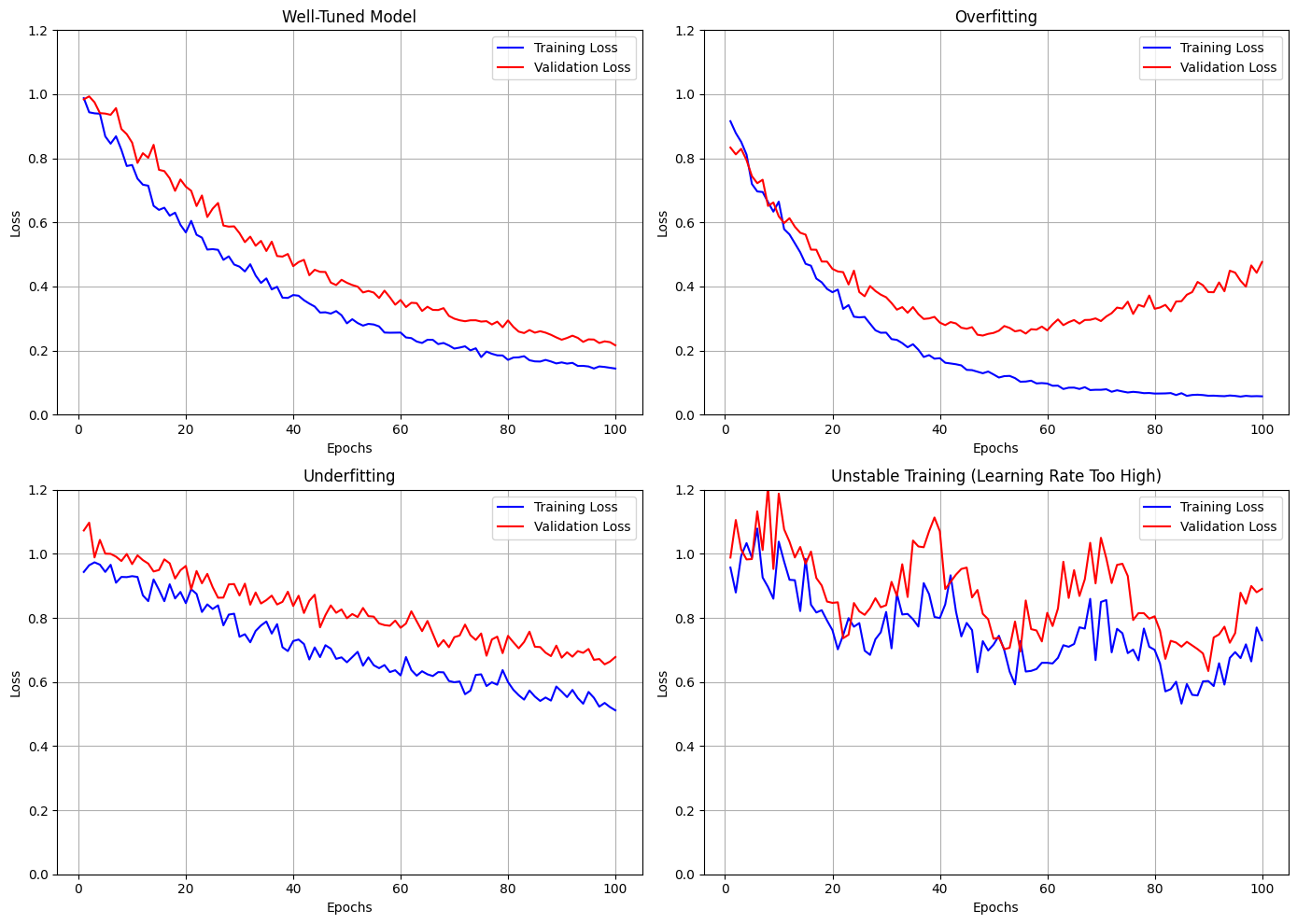
Learning curves are essential diagnostic tools for neural network training. They track metrics like loss and accuracy over epochs, providing insights into the training dynamics.
Key patterns to look for in learning curves:
Convergence: Loss should decrease and accuracy should increase over time.
Overfitting: Training metrics improve while validation metrics stagnate or worsen.
Underfitting: Both training and validation metrics plateau at suboptimal values.
Instability: Erratic changes in metrics may indicate too high a learning rate or other issues.
importnumpyasnpimportmatplotlib.pyplotaspltdefplot_learning_curve_cases():"""Visualize different learning curve patterns and their interpretation"""epochs=np.arange(1,101)# Case 1: Good fitloss_good_train=0.9*np.exp(-0.03*epochs)+0.1loss_good_val=0.9*np.exp(-0.025*epochs)+0.15# Case 2: Overfittingloss_overfit_train=0.9*np.exp(-0.05*epochs)+0.05loss_overfit_val=0.7*np.exp(-0.05*epochs)+0.20+0.3*(np.exp(0.012*(epochs-50))-1)*(epochs>50)# Case 3: Underfittingloss_underfit_train=0.6*np.exp(-0.015*epochs)+0.4loss_underfit_val=0.6*np.exp(-0.01*epochs)+0.45# Case 4: Learning rate too highloss_lr_high_train=0.5+0.4*np.exp(-0.01*epochs)+0.1*np.sin(0.2*epochs)loss_lr_high_val=0.6+0.4*np.exp(-0.008*epochs)+0.12*np.sin(0.2*epochs)# Add noise to make curves look realisticnp.random.seed(42)noise_factor=0.03loss_good_train=loss_good_train*(1+np.random.normal(0,noise_factor,size=len(epochs)))loss_good_val=loss_good_val*(1+np.random.normal(0,noise_factor,size=len(epochs)))loss_overfit_train=loss_overfit_train*(1+np.random.normal(0,noise_factor,size=len(epochs)))loss_overfit_val=loss_overfit_val*(1+np.random.normal(0,noise_factor*1.5,size=len(epochs)))loss_underfit_train=loss_underfit_train*(1+np.random.normal(0,noise_factor,size=len(epochs)))loss_underfit_val=loss_underfit_val*(1+np.random.normal(0,noise_factor,size=len(epochs)))loss_lr_high_train=loss_lr_high_train*(1+np.random.normal(0,noise_factor*2,size=len(epochs)))loss_lr_high_val=loss_lr_high_val*(1+np.random.normal(0,noise_factor*2,size=len(epochs)))# Set consistent y-axis limitsy_min=0y_max=1.2# Create plotsfig,axes=plt.subplots(2,2,figsize=(14,10))# Case 1: Good fitaxes[0,0].plot(epochs,loss_good_train,'b-',label='Training Loss')axes[0,0].plot(epochs,loss_good_val,'r-',label='Validation Loss')axes[0,0].set_title('Well-Tuned Model')axes[0,0].set_xlabel('Epochs')axes[0,0].set_ylabel('Loss')axes[0,0].set_ylim(y_min,y_max)axes[0,0].legend()axes[0,0].grid(True)# Case 2: Overfittingaxes[0,1].plot(epochs,loss_overfit_train,'b-',label='Training Loss')axes[0,1].plot(epochs,loss_overfit_val,'r-',label='Validation Loss')axes[0,1].set_title('Overfitting')axes[0,1].set_xlabel('Epochs')axes[0,1].set_ylabel('Loss')axes[0,1].set_ylim(y_min,y_max)axes[0,1].legend()axes[0,1].grid(True)# Case 3: Underfittingaxes[1,0].plot(epochs,loss_underfit_train,'b-',label='Training Loss')axes[1,0].plot(epochs,loss_underfit_val,'r-',label='Validation Loss')axes[1,0].set_title('Underfitting')axes[1,0].set_xlabel('Epochs')axes[1,0].set_ylabel('Loss')axes[1,0].set_ylim(y_min,y_max)axes[1,0].legend()axes[1,0].grid(True)# Case 4: Learning rate too highaxes[1,1].plot(epochs,loss_lr_high_train,'b-',label='Training Loss')axes[1,1].plot(epochs,loss_lr_high_val,'r-',label='Validation Loss')axes[1,1].set_title('Unstable Training (Learning Rate Too High)')axes[1,1].set_xlabel('Epochs')axes[1,1].set_ylabel('Loss')axes[1,1].set_ylim(y_min,y_max)axes[1,1].legend()axes[1,1].grid(True)plt.tight_layout()plt.show()plot_learning_curve_cases()
Learning curve patterns and their interpretation
Diagnosing Common Training Issues
Vanishing Gradients
Symptoms:
Early layers stop learning (weights barely change)
Training progresses very slowly
Solutions:
Use ReLU or Leaky ReLU activations
Proper weight initialization (He, Xavier)
Consider residual connections for very deep networks
Exploding Gradients
Symptoms:
Loss becomes NaN or extremely large
Weights grow to very large values
Solutions:
Reduce learning rate
Implement gradient clipping
Proper weight initialization
Batch normalization
Saturation
Symptoms:
Activations are mostly near extreme values (0 or 1)
Gradients become very small
Solutions:
Normalize inputs
Use proper weight initialization
Consider batch normalization
Dying ReLUs
Symptoms:
Many ReLU units output zero for all inputs
Network capacity is reduced
Solutions:
Lower learning rate
Use Leaky ReLU or other activation variants
He initialization
Visualizing Model Behavior
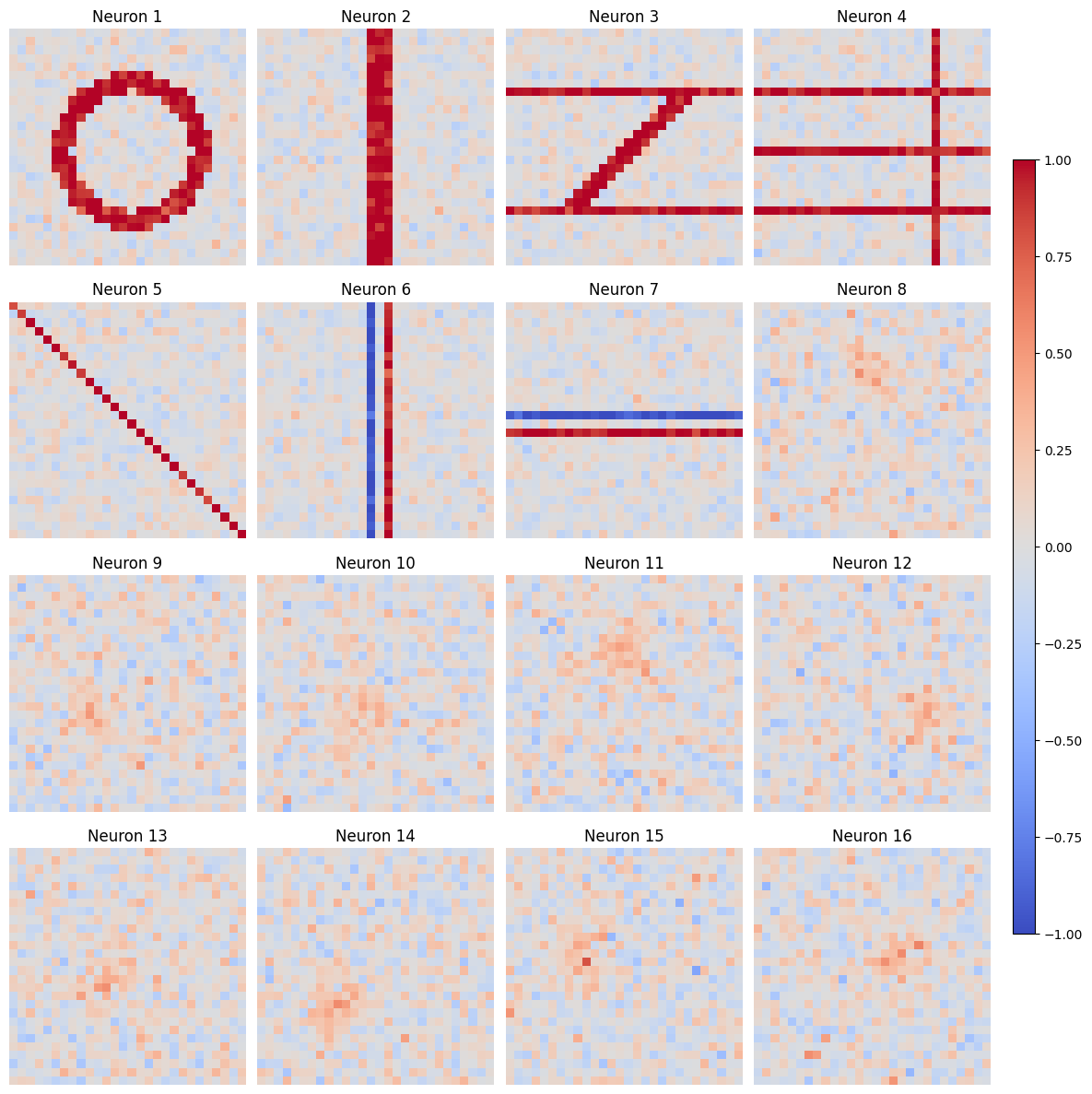
Visualizing weights and activations can provide insights into what the network is learning:
importnumpyasnpimportmatplotlib.pyplotaspltdefvisualize_mnist_weights():"""Simulate and visualize weights from a network trained on MNIST"""# Simulate weights that might develop when training on MNISTnp.random.seed(42)# Create a grid of artificial weight patterns (simulating features learned from MNIST)n_neurons=16img_size=28# Initialize random weightsweights=np.random.randn(n_neurons,img_size,img_size)*0.01# Modify weights to simulate learned patternsdigit_patterns=[]# Simulate digit 0 (circle)pattern0=np.zeros((img_size,img_size))foriinrange(img_size):forjinrange(img_size):if((i-img_size/2)**2+(j-img_size/2)**2<(img_size/3)**2)and \
((i-img_size/2)**2+(j-img_size/2)**2>(img_size/4)**2):pattern0[i,j]=1digit_patterns.append(pattern0)# Simulate digit 1 (vertical line)pattern1=np.zeros((img_size,img_size))pattern1[:,img_size//2-1:img_size//2+2]=1digit_patterns.append(pattern1)# Simulate digit 2 (top and bottom horizontal lines with diagonal)pattern2=np.zeros((img_size,img_size))pattern2[img_size//4,:]=1pattern2[3*img_size//4,:]=1foriinrange(img_size//4,3*img_size//4):j=3*img_size//4-(i-img_size//4)pattern2[i,j-1:j+2]=1digit_patterns.append(pattern2)# Simulate digit 3 (horizontal lines with gaps)pattern3=np.zeros((img_size,img_size))pattern3[img_size//4,:]=1pattern3[img_size//2,:]=1pattern3[3*img_size//4,:]=1pattern3[:,3*img_size//4]=1digit_patterns.append(pattern3)# Simulate stroke detector (diagonal line)stroke1=np.zeros((img_size,img_size))foriinrange(img_size):j=iif0<=j<img_size:stroke1[i,j]=1digit_patterns.append(stroke1)# Simulate vertical edge detectoredge1=np.zeros((img_size,img_size))edge1[:,img_size//2-1]=-1edge1[:,img_size//2+1]=1digit_patterns.append(edge1)# Simulate horizontal edge detectoredge2=np.zeros((img_size,img_size))edge2[img_size//2-1,:]=-1edge2[img_size//2+1,:]=1digit_patterns.append(edge2)# Create the rest as noise with some structureforiinrange(n_neurons-len(digit_patterns)):pattern=np.random.randn(img_size,img_size)*0.1# Add some structure (random blob)center_i=np.random.randint(img_size//4,3*img_size//4)center_j=np.random.randint(img_size//4,3*img_size//4)fori_idxinrange(img_size):forj_idxinrange(img_size):dist=np.sqrt((i_idx-center_i)**2+(j_idx-center_j)**2)ifdist<img_size//5:pattern[i_idx,j_idx]+=0.5*np.exp(-dist/(img_size//10))digit_patterns.append(pattern)# Assign patterns to weightsforiinrange(n_neurons):weights[i]=digit_patterns[i]+np.random.randn(img_size,img_size)*0.1# Flatten weights for visualizationweights_flat=weights.reshape(n_neurons,img_size*img_size)# Plot weightsfig,axes=plt.subplots(4,4,figsize=(12,12))fori,axinenumerate(axes.flat):ifi<n_neurons:im=ax.imshow(weights[i],cmap='coolwarm',vmin=-1,vmax=1)ax.set_title(f'Neuron {i+1}')ax.axis('off')plt.tight_layout()plt.subplots_adjust(right=0.9)cbar_ax=fig.add_axes([0.92,0.15,0.02,0.7])fig.colorbar(im,cax=cbar_ax)plt.show()visualize_mnist_weights()
Visualization of first-layer weights in a network trained on MNIST
After training on MNIST, first-layer weights often resemble edge detectors, stroke patterns, or digit fragments. These visualizations provide insights into what features the network has learned to recognize.
Object-Oriented Neural Network Design
An object-oriented design provides a flexible framework for neural network implementation, though it is optional for this assignment. Any well-structured solution that encapsulates network components and manages their interactions appropriately suffices. The patterns presented here mirror design principles found in frameworks like PyTorch, and are valuable context for understanding these frameworks.
Design Patterns for Neural Network Implementation
Neural network designs benefit from clear separation of concerns through abstraction. Core components like layers and activation functions can be implemented as distinct classes with well-defined interfaces:
classLayer:"""Abstract base class establishing neural network layer interface"""defforward(self,inputs):"""Transform inputs through the layer"""raiseNotImplementedError()defbackward(self,grad_output):"""Propagate gradients backward and compute parameter gradients"""raiseNotImplementedError()defparameters(self):"""Return trainable parameters"""return[]
This abstraction establishes a uniform interface that decouples layer implementations from the broader network architecture. Each concrete layer need only satisfy this contract without knowledge of the overall network structure.
Computational Graph Representation
Neural networks form computational graphs where data flows forward through transformations during inference and gradients flow backward during training. Object-oriented designs can explicitly model this structure:
classComputationalNode:"""Base class for nodes in computational graph"""defforward(self,*inputs):"""Compute output from inputs"""self.inputs=inputs# Cache for backward passreturnself._compute_output(*inputs)defbackward(self,grad_output):"""Compute gradients with respect to inputs"""returnself._compute_input_gradients(grad_output)def_compute_output(self,*inputs):raiseNotImplementedError()def_compute_input_gradients(self,grad_output):raiseNotImplementedError()
Linear transformations represent fundamental operations in neural networks, implementing the matrix multiplication operation \(\mathbf{z} = \mathbf{W}\mathbf{a} + \mathbf{b}\):
classLinearTransformation(Layer):"""Implements affine transformation z = Wa + b"""def__init__(self,input_dim,output_dim,initialization_scale=0.01):# Initialize parametersself.W=np.random.randn(output_dim,input_dim)*initialization_scaleself.b=np.zeros((output_dim,1))self.gradients={'W':None,'b':None}defforward(self,inputs):# Cache inputs for backward passself.cache=inputs# Compute z = Wa + breturnnp.dot(self.W,inputs)+self.b
The activation function introduces non-linearity, enabling the network to model complex relationships. Different activation functions exhibit distinct behavior during gradient propagation:
classActivation(Layer):"""Applies non-linear activation function element-wise"""defforward(self,inputs):self.cache=inputsreturnself._activation_function(inputs)defbackward(self,grad_output):# Element-wise product with activation derivativeinputs=self.cachereturngrad_output*self._activation_derivative(inputs)
Parameter Management and Optimization
The backpropagation algorithm computes parameter gradients, which must be systematically organized and applied during optimization. A structured approach to parameter management facilitates implementation:
classParameter:"""Encapsulates trainable parameters and associated gradients"""def__init__(self,data):self.data=dataself.grad=np.zeros_like(data)defupdate(self,learning_rate):"""Apply gradient descent update"""self.data-=learning_rate*self.grad
Modern optimizers extend beyond vanilla gradient descent and incorporate momentum, adaptive learning rates, and regularization. These algorithms benefit from encapsulation:
classOptimizer:"""Base class for optimization algorithms"""def__init__(self,parameters,learning_rate):self.parameters=parametersself.learning_rate=learning_ratedefstep(self):"""Update parameters using computed gradients"""raiseNotImplementedError()
Network Composition and Training
The neural network integrates these components into a cohesive system that manages forward and backward signal propagation:
classNeuralNetwork:"""Integrates layers into complete neural network"""def__init__(self):self.layers=[]defadd_layer(self,layer):"""Append layer to network"""self.layers.append(layer)defforward(self,inputs):"""Propagate inputs through the network"""activation=inputsforlayerinself.layers:activation=layer.forward(activation)returnactivationdefbackward(self,gradient):"""Backpropagate gradient through the network"""forlayerinreversed(self.layers):gradient=layer.backward(gradient)
The complete training loop orchestrates mini-batch preparation, forward and backward passes, and parameter updates:
deftrain_epoch(network,X,y,batch_size,optimizer):"""Train network for one epoch"""indices=np.random.permutation(X.shape[1])forstart_idxinrange(0,X.shape[1],batch_size):# Extract mini-batchbatch_indices=indices[start_idx:start_idx+batch_size]X_batch=X[:,batch_indices]y_batch=y[:,batch_indices]# Forward passy_pred=network.forward(X_batch)# Compute loss gradientgradient=compute_loss_gradient(y_pred,y_batch)# Backward passnetwork.backward(gradient)# Update parametersoptimizer.step()
This approach facilitates separation of concerns, enabling independent experimentation with network structure, activation functions, and optimization techniques. The interfaces provide sufficient abstraction to support a wide range of implementation strategies while maintaining a coherent overall design.
MNIST Implementation Considerations
Data Preparation
For MNIST, proper data preparation includes:
Normalization: Scale pixel values to [0, 1] by dividing by 255
Reshaping: Convert 28×28 images to vectors of size 784
One-hot encoding: Convert class labels to one-hot vectors
defprepare_mnist_data(X,y):"""Prepare MNIST data for neural network training"""# Normalize pixel values to [0, 1]X=X/255.0# Reshape images to vectorsiflen(X.shape)>2:X=X.reshape(X.shape[0],-1).T# Shape: (784, num_samples)# Convert labels to one-hot encodingy_one_hot=np.zeros((10,y.shape[0]))foriinrange(y.shape[0]):y_one_hot[y[i],i]=1returnX,y_one_hot
Network Architecture
For MNIST classification, a simple architecture might include:
Input layer: 784 neurons (28×28 flattened image)
Hidden layer(s): 128-512 neurons with ReLU or tanh activation
Output layer: 10 neurons with softmax activation
defcreate_mnist_network(hidden_sizes=[128],activation='relu'):"""Create a neural network for MNIST classification"""model=NeuralNetwork()# Input layer to first hidden layermodel.add(LinearLayer(784,hidden_sizes[0]))# Add activation functionifactivation=='relu':model.add(ReLU())else:# tanhmodel.add(Tanh())# Add additional hidden layers if specifiedforiinrange(1,len(hidden_sizes)):model.add(LinearLayer(hidden_sizes[i-1],hidden_sizes[i]))ifactivation=='relu':model.add(ReLU())else:# tanhmodel.add(Tanh())# Output layermodel.add(LinearLayer(hidden_sizes[-1],10))# Note: Softmax is typically integrated with cross-entropy loss for numerical stability# Set loss functionmodel.set_loss(CrossEntropyLoss())returnmodel
Hyperparameter Suggestions
Key hyperparameters for MNIST classification:
Hyperparameter
Typical Range
Considerations
Learning Rate
0.01-0.1
Start with 0.01 and adjust based on training dynamics
Batch Size
50-1000
Smaller batches introduce more noise, larger batches are more stable
Hidden Layer Size
64-512
Start with 128 and adjust based on performance
Activation
ReLU or tanh
ReLU often converges faster, tanh can be more stable
Weight Initialization
He or Xavier
Match initialization to activation (He for ReLU, Xavier for tanh)
Regularization
L2 (0.0001-0.01)
Start with 0.0001 and adjust if overfitting occurs
For the required learning rate decay, reducing the learning rate by a factor of 2 after epochs 20 and 40 (as specified) typically works well, but you may need to adjust based on your specific architecture.